


 156
156
Applies to v.5.2.11.6:
Cash Rounding Overview
With the U.S. discontinuing the production of pennies, cash rounding provides a simple way to adjust cash transactions to the nearest 5 cents.
What is Cash Rounding?
Cash rounding adjusts cash payment totals to the nearest $0.05.
All non-cash payment methods (Credit Card, Store Credit, Gift Cards, Vouchers) are not affected and will continue to charge the exact transaction amount.
Rounding is applied after sales tax has been calculated.
New Functionality
Cash rounding is included in Version 5.2.11.6.
Step 1: Configure Rounding Options (Payments Screen)
Update the Payments screen for each location.
You will be able to choose one of the following Rounding Types:
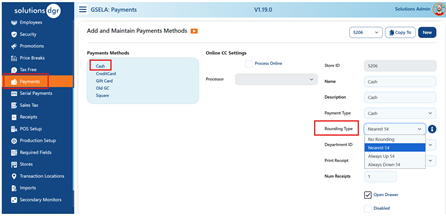
Rounding Type Options
1. No Rounding
• Disables cash rounding.
• Cash transactions reflect the exact amount.
2. Nearest $0.05 (Standard Rounding)
• $0.01–$0.02 → round down
• $0.03–$0.04 → round up
• $0.06–$0.07 → round down
• $0.08–$0.09 → round up
3. Always Round Up to $0.05 (we have chosen this option)
• Always rounds up to the next increment of 5 cents.
Example: $0.91 → $0.95
4. Always Round Down to $0.05
• Always rounds down to the previous increment of 5 cents.
Example: $0.94 → $0.90; $0.92 → $0.90
Exact Change vs. Returns
• The system allows exact cash to be taken at the register.
• However, during returns, exact change cannot be issued. The return amount will follow the location’s rounding rule.
Step 2: Add GL Code for Cash Rounding
A new department named Cash Rounding has been created for your organization.
Assign a GL Code to this department for all locations so rounding adjustments are properly reflected in your accounting export.
This prevents rounding differences from appearing in your Over/Short accounts unless you intentionally want them tracked there.
Note:
If your organization does not need a dedicated Cash Rounding department, you may redirect rounding to other departments (e.g., Textiles or Voucher Sales). Any department is acceptable as long as a GL code is assigned.
Cashier Workstation Messaging
After rounding is enabled and configured, cashiers will see a workstation message announcing the change (for example: “Goodbye to pennies!”).
This message will appear for each user until “Don’t show this again” is selected by the cashier.
This message will not display if cash rounding remains turned off.
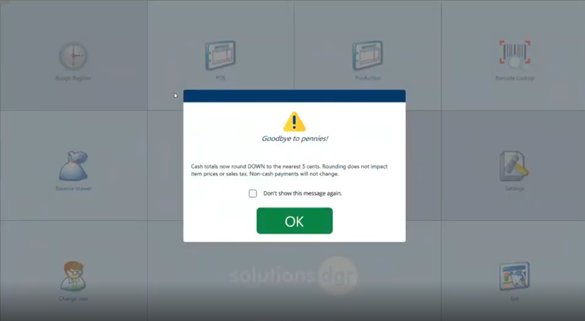
Impact on the Register
There are no changes to the transaction screen.
Rounding adjustments are shown only after a cashier selects Pay Now.
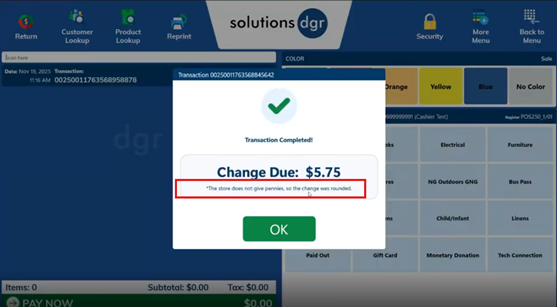
Reporting
As of the creation of this KB article, cash rounding displays on two reports:
1. S1 Report
• Includes a new line item under Misc Payment Amounts.
• The amount is included in the Over/Short calculation.
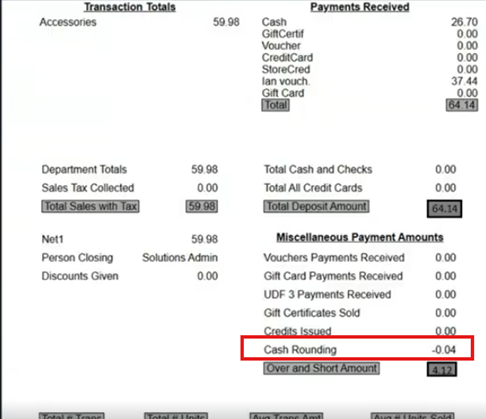
2. Export Report
• Adds a new journal entry line for Cash Rounding.
• Mapped to the GL code assigned to the Cash Rounding department (or whichever department your organization uses).

